See the next decision behind the status.
Bring goals, task results and waiting answers into one management view. Open the work behind a status, see the colleague responsible and decide where the team needs your help.
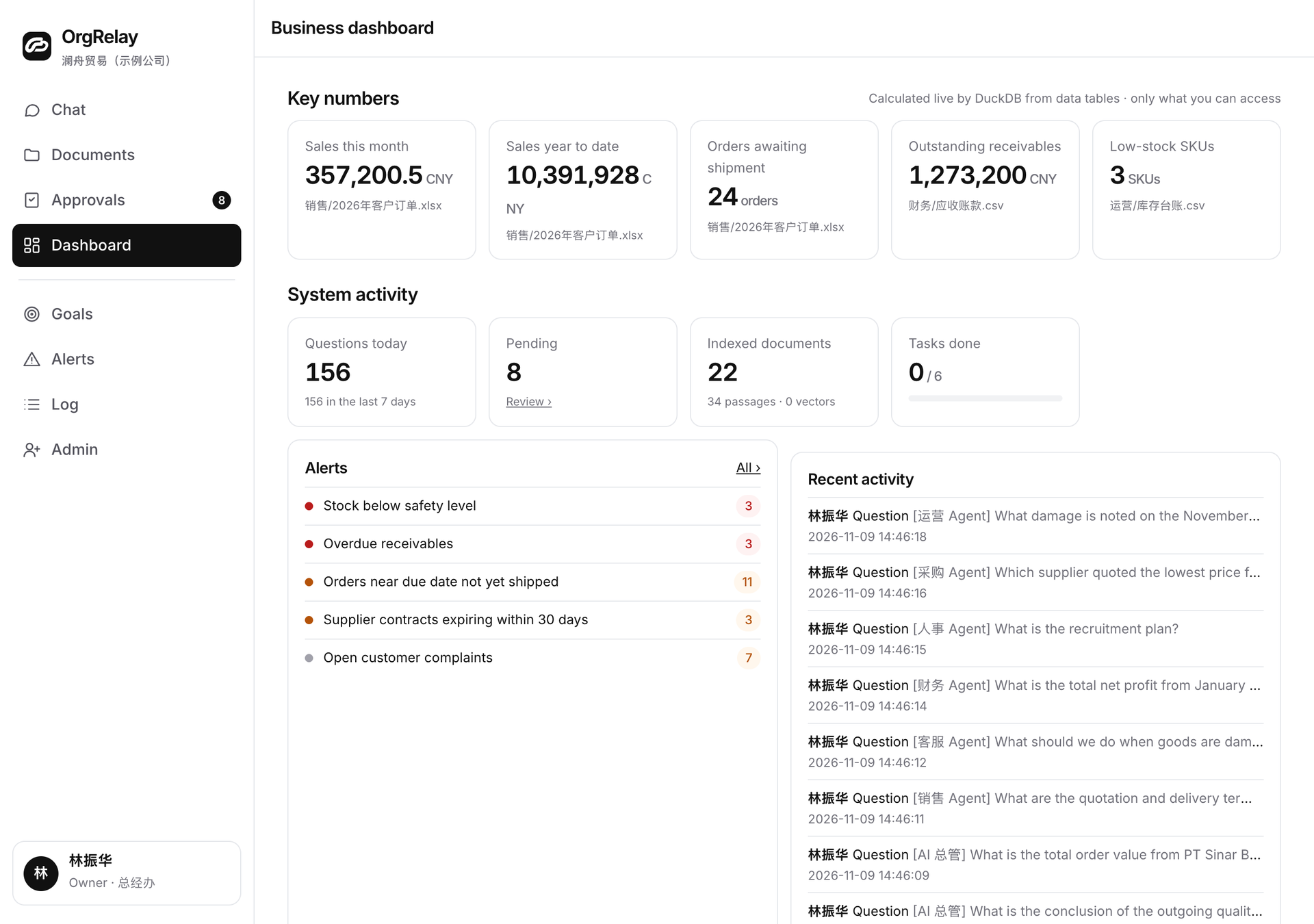
Follow progress back to the work.
A client handoff marked ready should lead to the agreed result and the person receiving it. Goals and tasks provide that context; the AI Chief brings the task updates into the company’s goal.
Employees add the result of their work. Managers read the next dependency and the review it needs. The dashboard puts those viewpoints beside the same task.
Read the view in the order you can act.
Start with the commitment or approval that needs a decision. A Sales Agent and Customer Service Agent can contribute customer drafts to the same review.
Use company knowledge to inspect the source behind an important condition. Alerts identify the waiting answer that affects the next handoff.
- 01
1 · Choose the management question
Read the goal through a useful question: which client handoffs are ready for review, and which need someone’s answer?
- 02
2 · Open the supporting work
Read the task result, source reference and reviewer. Follow a date or condition to the material that explains it.
- 03
3 · Find the next decision
Distinguish a draft awaiting review, a question awaiting a source owner and an approved action awaiting its recipient.
- 04
4 · Name the follow-up
Assign the next action to the colleague who can resolve it and record when the team will check the result.
Management attention across the work

A services manager reviews the handoff week.
A services team wants each Friday handoff to contain the client scope, delivery summary and next owner. The manager uses that outcome to decide what belongs in the weekly view.
- 01
Monday · Define the review
The manager agrees the selected projects and the handoff contents. Each task names the colleague who supplies the result and the person who checks it.
- 02
Tuesday · Read the task results
One project has a client draft, another has a completed internal check. The dashboard leads to the result and reviewer behind each update.
- 03
Wednesday · Resolve a shared question
Two projects depend on the same scope answer. The manager asks the client contact to confirm it and connects the answer to both tasks.
- 04
Thursday · Check the handoff version
The receiving manager reads the current summary and confirms which client scope and delivery information it uses.
- 05
Friday · Carry clear actions forward
The review lists completed handoffs, waiting questions and the colleague responsible for each next response.
Make the decision visible beside the task.
A Finance Agent can bring record questions into the review. The company’s authority map determines who decides what happens next.
| Dashboard action | AI preparation | Manager responsibility | Owner responsibility |
|---|---|---|---|
| Summarize progress | Assemble the goal, task updates and open questions | Confirm the team summary | Choose company priorities |
| Review a task result | Present the result with its source references | Accept the output against the task brief | Decide reserved business commitments |
| Handle an exception | Explain the affected task and requested answer | Route the question and assign follow-up | Authorize significant changes above delegation |
| Change the goal | List affected tasks and dependencies | Assess delivery implications | Set the revised company outcome |
A useful management view starts with clear task updates.
The product overview connects goals to the daily work. The Operations Agent brings cross-team handoffs into that loop. Each update needs a task, a result or question, an owner and a relevant date.
Integrations help define source fields and their meaning. The security page explains how this website handles its own information. For a team review, choose sources the responsible colleagues can explain.

Use the view to settle a real question.
In a growing company, choose a goal that crosses two teams and ask both managers to follow one waiting answer through the view.
The resource library provides briefs for that discussion. Compare plan scopes around the people involved and review the company details through the company form.
Questions, answered.
What should I read first?
Start with the decision or dependency that affects the next handoff, then open its task and source context.
How does the dashboard describe progress?
Through task results, reviewer responses, waiting questions and the owners of the next actions.
Can different roles use the same view?
Yes. Employees contribute results, managers follow handoffs and owners read the company goal and reserved decisions.
What makes an update useful?
A clear result or question, its task, the responsible colleague and the date or business period it describes.