See what each offer actually buys.
Put supplier terms beside the item your team needs. The Procurement Agent compares specifications, units and delivery conditions, then brings the buyer the questions and choices that determine the purchase.
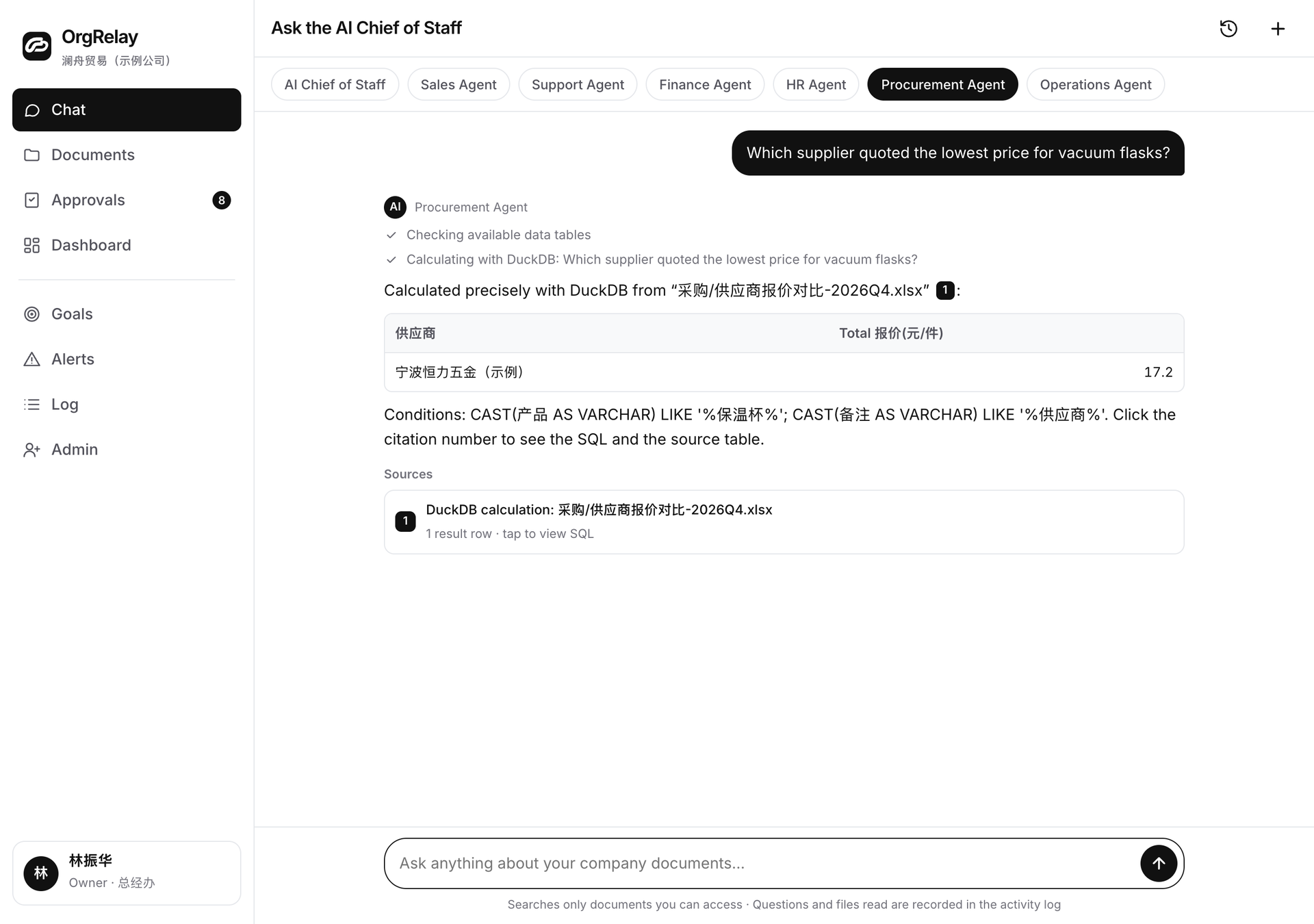
Read the offer against the requested item.
An ingredient request names a specification, unit and required date. The task brief keeps those details beside the selected quotations. Company knowledge supplies the relevant purchasing instructions.
Approvals route the proposed purchase to the authorized buyer or owner. Integrations describe the source fields the comparison needs, and the security page explains this website’s information handling.
Keep the original terms within reach.
Useful inputs include the requested item, specification, quantity, unit, required date, selected quotations and the person explaining each source. Company knowledge brings the applicable company instructions into that context.
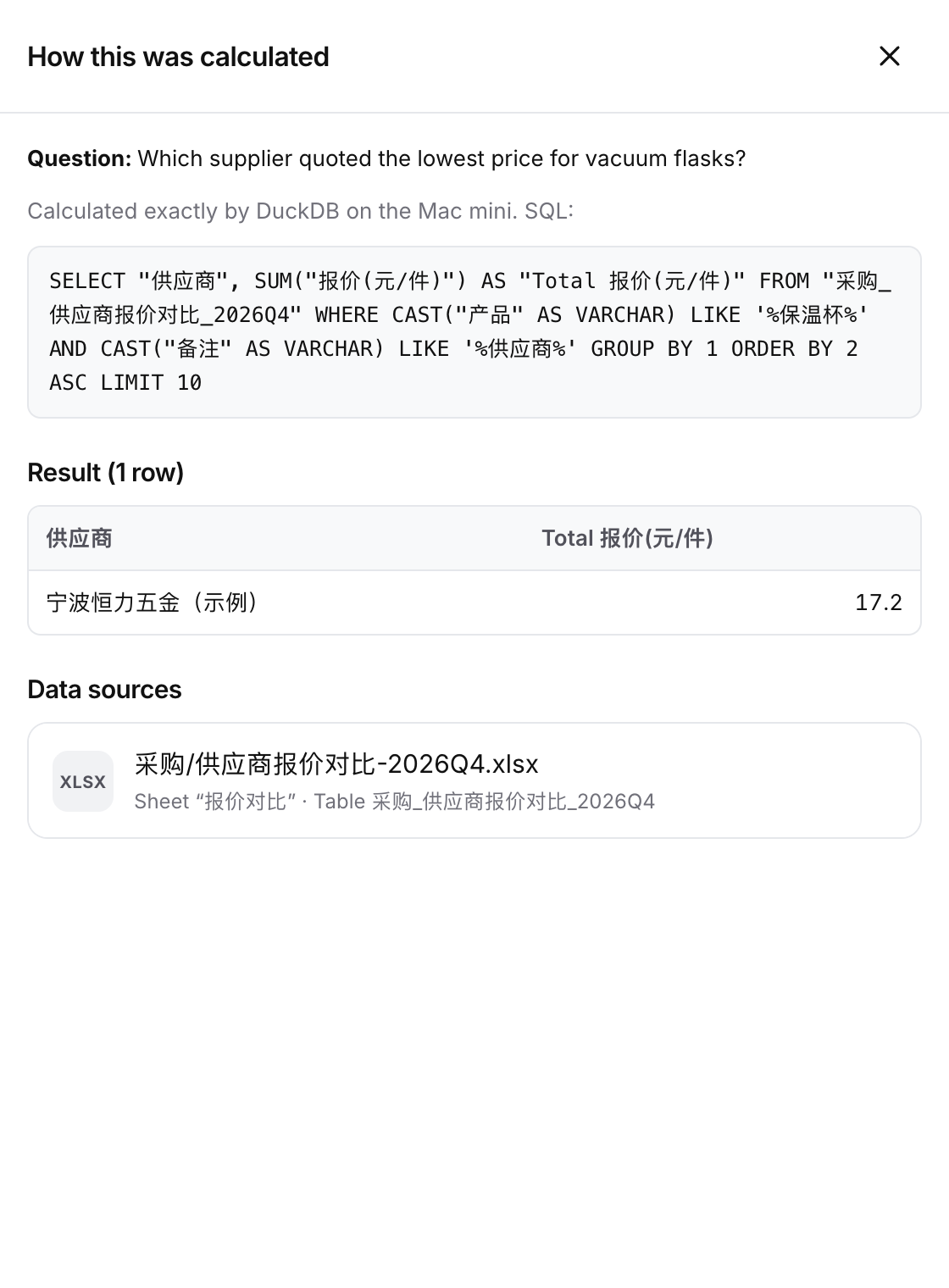
The result is a side-by-side comparison, the source references, clarification questions and the buyer’s next choice. Terms such as pack size, delivery basis and required date stay visible through the review.
Six jobs that help the buyer decide.
The AI Chief connects the purchasing job to its company goal. Alerts surface a source question; the dashboard follows its next action. Operations and finance contribute delivery and record context.
- 01
Clarify the item
Bring the required specification, quantity, unit and date into the comparison brief.
- 02
List the quotations
Keep each supplied offer with its reference, period and the colleague who can explain its terms.
- 03
Compare the relevant fields
Place specification, unit, quantity and delivery conditions side by side so the buyer can judge what each offer covers.
- 04
Ask for the needed clarification
Highlight a pack size, delivery basis or source condition the buyer needs confirmed before choosing an offer.
- 05
Present the purchasing choice
Bring the comparison, source answers and proposed next action to the manager or authorized approver.
- 06
Connect the purchasing handoff
Record the reviewer’s choice, the colleague handling the next action and the information the receiving team needs.
Give the comparison a buyer and a purpose.
A trading team may compare quoted product specifications; a restaurant group may compare ingredient pack sizes and delivery dates. Managers agree the comparison, and owners retain the decisions assigned to their role.
- 01
Define the comparison fields
Name the requested item, the selected offers and the condition the buyer needs to decide. Choose the receiving reviewer.
- 02
Check the sources and answers
Follow each important field to its quotation. Ask the source owner to confirm units, timing and any different basis of supply.
- 03
Choose the next purchasing action
The buyer reviews the trade-offs and routes the proposed commitment through the company’s approval process.
A comparison that preserves the differences
A restaurant group compares an ingredient requirement.
The purchasing manager receives a branch request and selected supplier offers. The team needs a comparison that keeps pack size and required delivery date clear.
- 01
Monday · Agree the requirement
The branch owner confirms the item description, unit, quantity and required date. The buyer selects the quotation set.
- 02
Tuesday · Line up the units
The Agent highlights the pack-size fields beside the requested unit. Purchasing asks the supplier contact for the clarification the comparison needs.
- 03
Wednesday · Confirm the conditions
The buyer checks the source answer and the quoted delivery basis with the relevant supplier contact.
- 04
Thursday · Review the choices
The manager reads the specification, unit and delivery trade-offs together, then decides the recommendation within their mandate.
- 05
Friday · Make the handoff
The authorized approver decides the proposed commitment. Purchasing records the next action and the receiving colleague.

The buyer and approver own the commitment.
The people-in-control guide helps the company assign comparison review, supplier choice and spending authority.
| Activity | Agent preparation | Manager review | Owner or reserved approver |
|---|---|---|---|
| Item comparison | Extract relevant fields from the selected sources | Confirm requirements and compare the choices | Set purchasing responsibilities and policy |
| Supplier clarification | List the question and its source reference | Confirm the answer with the appropriate contact | Decide reserved commercial conditions |
| Purchase recommendation | Summarize terms and trade-offs | Choose a recommendation within mandate | Authorize reserved spending or supplier commitments |
| Purchasing handoff | Record the chosen next action and owner | Confirm the information passed to the receiving team | Approve consequential changes beyond delegation |
Start with a requirement the buyer can explain.
Use a comparison brief to capture the item, selected offers, review fields and receiving buyer. Include the unit or delivery question that comes up most often in that process.
Compare plan scopes and review your company details in the company form.
Questions, answered.
What should the comparison brief contain?
The item specification, quantity, unit, required date, selected offers and the buyer who receives the result.
How does the Agent help compare offers?
It lines up the supplied fields, preserves the original terms and highlights the clarification the buyer needs.
Who chooses the supplier?
The authorized buyer or manager makes the choice within the company’s purchasing mandate.
Who approves spending?
The company’s authority rules determine the approver for the proposed purchase and any reserved terms.